Feature
Inbox monitoring
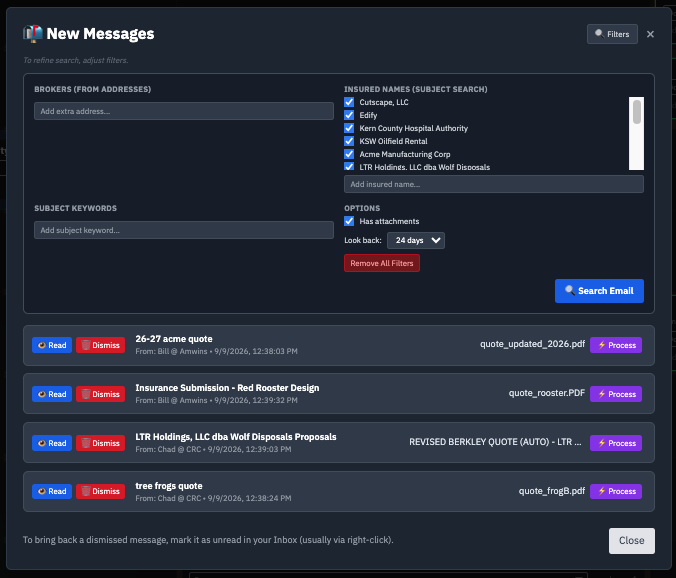
Risk-Runway watches your Outlook inbox, matches incoming broker and insured emails to the right submission, and pulls in the attachments automatically — so quotes stop getting buried in email.
The problem it solves
In surplus lines, most of the back-and-forth happens over email. A single submission goes out to several markets, and quotes, revisions, and broker replies trickle back over days or weeks — scattered across different threads, from different senders, in no particular order. It's on a person to notice each one, open it, download the attachment, and file it against the right deal. When that person is busy, quotes sit unread, follow-ups go unanswered, and the pipeline's status quietly goes stale.
The inbox is the worst possible system of record for time-sensitive work, yet it's where the entire E&S conversation lives. A quote that arrives Friday afternoon and isn't seen until Monday is three days of lost response time on an account where speed helps win the business.
How it works
Risk-Runway connects to your Outlook inbox using OAuth — the same secure, standard method banks use to link accounts without ever seeing or storing your password. Once connected, it watches for relevant messages and does the filing for you, so quotes flow onto your pipeline instead of getting buried.
- Matches incoming emails to the right broker, insured, and submission, using the contacts and accounts you've configured.
- Captures attachments and stores them encrypted against the deal, ready for parsing or for the record.
- Triggers alerts so the right person knows the moment a quote arrives, without watching the inbox.
- Sorts correspondence from quotes — a document can be parsed for its data, or simply kept as correspondence for the file.
Because matching happens automatically, the work of triage — deciding what an email is and where it belongs — stops being a manual chore. The relevant messages surface and attach themselves to the right account; the noise stays out of your way.
Is it secure?
Access is granted through OAuth, so Risk-Runway never sees your password, and the permission is limited to reading the matching emails from your configured brokers and contacts. You can revoke that access at any time from your own Microsoft account settings, exactly like disconnecting any other connected app. Captured documents are stored encrypted, and each agency's data is walled off from every other agency's.
Why it matters
Whether you parse the data out of a message or keep it as correspondence, nothing sits unnoticed in an inbox and every document is where it should be at bind. That means faster responses to brokers, fewer dropped balls on time-sensitive submissions, and a pipeline whose status reflects reality without anyone maintaining it by hand.
Frequently asked questions
How does inbox monitoring connect to Outlook?
Through OAuth — the same secure method used to link financial accounts without exposing your password. Once connected, it watches for relevant broker and insured emails and pulls quotes and correspondence into the platform automatically.
Is OAuth access to my inbox safe, and what does it grant?
It only grants the specific permission you approve — reading matching emails from your configured contacts. Your password is never shared, and you can revoke access anytime from your Microsoft account settings.
What happens to attachments that come in by email?
Matching attachments are captured and stored encrypted against the right submission. You can parse the data out of a document like a quote, or keep it as correspondence for the record.
See it connect to your inbox
We'll show how OAuth connects safely and what gets captured. 20 minutes, no pressure.
Request a Demo